"/>

èìôåï ãéâéèìé Avaya 1416 Global Digital Phone 700508194 with Icon Keys

èìôåï ãéâéèìé Avaya 1416 Digital Telephone with Icon Keys - Partner Version or IPO Version

îàôééðéí åùéãøåâéí:

ôøèéí ðåñôéí:

  • î÷è: 3733
  • àçøéåú: 12 çåãùéí
  • àçøéåú: éáåàï øùîé  
  • àôùøåéåú îùìåç:
    àôùøåéåú îùìåç ìîåöø ìáçéøä á÷åôä:
    • àéñåó òöîé áçéðí
    • îùìåç òã äáéú òí ùìéç 45.00 ¤
    • îùìåç îäéø úåê 24 ùòåú - ìéòãéí áéï çãøä ìâãøä 85.00 ¤
    • îùìåç ìð÷åãú àéñåó - çáéìåú ÷èðåú 19.00 ¤
    ñâéøä
ìøëéùú îåöø æä äú÷ùøå ì÷áìú ôøèéí
  • +
  • -
visaisracardmastercarddinersamerican express

èìôåï ãéâéèìé Avaya 1416 Global Digital Phone 700508194 with Icon Keys


About the Avaya 1416 Global Digital Phone with Icon Keys

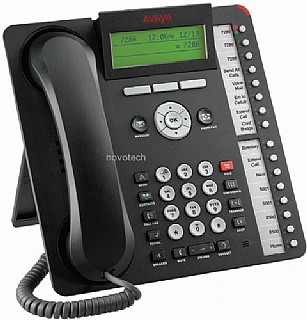
The Avaya 1416 Digital Deskphone is designed for the Navigator type user. Receptionists, assistants, and managers are examples of Navigator users ndash people who answer incoming calls, transfer customers to different departments or extensions, and monitor several line appearances throughout a typical day. For the Navigator user, this phone provides the most one-touch line/feature/speed-dial buttons without the need to scroll through on-screen lists.

  • Supports 16 administrable feature buttons on the phone itself ndash and a 32-button expansion module provides access to a total of 48 feature keys or speed dial buttons
  • Each of the buttons features a dual LED (red, green) providing explicit status for the user
  • For a familiar look and feel, the 1416 Digital Deskphone includes several fixed and icon-labeled feature keys for common telephone tasks including conference, transfer, drop, hold and mute
  • In addition, the phone includes a high-quality speakerphone, and supports a broad portfolio of wired and wireless headsets through its integrated headset jack
  • Context sensitive user interface along with three softkeys and a four-way navigation cluster ndash ideal for scrolling through the local contacts list or call logs
  • The viewing angle of the display is adjustable and measures four lines by 24 characters
  • Additional caller related information is displayed with active appearances for easier call handling
  • The display is white backlit for easier viewing in all lighting conditions

Avaya 1416 Global Digital Phone with Icon Keys Specifics

  • 16 Line appearance/feature key buttons
  • Availabile in Black
  • Handset with 9-foot cord
  • Dual Position Flip Stand
  • Wall-mountable
  • Adjustable tilt Display
  • Graphical Display size: 181 x 56 pixels
  • 4 rows x 26 characters (approximate)
  • 4 x 14 Chinese characters (12x12 pixels per character)
  • Icon-labelled feature buttons: Speaker, Mute, Volume, Avaya Menu, Hold, Conference, Transfer, Drop, Redial
  • Icon-labelled feature buttons: Headset, Phone, Call Log, Contacts, Voicemail Message
  • Icon-labelled Navigation Cluster (Up/Down, Left/Right, OK)
  • Message Waiting Indicator
  • 3 Contextual softkey buttons
  • Button Module 32 supported
  • Headset supported
  • 2-way speakerphone
  • 2-wired line interface
  • DCP Call Control Protocol
  • G711 Codec
  • Native support on Avaya Aura Communication Manager 6.0 with full access to Communication Manager call appearances and features
  • Native support on IP Office R6.0 with full access to IP Office call appearances and features
  • IP Office feature menu with status indication
  • Support of IP Office Hot Desking
  • Support with E07IEE2 and above

çååú ãòú òì äîåöø

îîåöò ãéøåâ îåöø ( çååú ãòú âåìùéí) , ëúåá çååú ãòú ìîåöø

èìôåï ãéâéèìé Avaya 1416 Global Digital Phone 700508194 with Icon Keys


About the Avaya 1416 Global Digital Phone with Icon Keys

The Avaya 1416 Digital Deskphone is designed for the Navigator type user. Receptionists, assistants, and managers are examples of Navigator users ndash people who answer incoming calls, transfer customers to different departments or extensions, and monitor several line appearances throughout a typical day. For the Navigator user, this phone provides the most one-touch line/feature/speed-dial buttons without the need to scroll through on-screen lists.

  • Supports 16 administrable feature buttons on the phone itself ndash and a 32-button expansion module provides access to a total of 48 feature keys or speed dial buttons
  • Each of the buttons features a dual LED (red, green) providing explicit status for the user
  • For a familiar look and feel, the 1416 Digital Deskphone includes several fixed and icon-labeled feature keys for common telephone tasks including conference, transfer, drop, hold and mute
  • In addition, the phone includes a high-quality speakerphone, and supports a broad portfolio of wired and wireless headsets through its integrated headset jack
  • Context sensitive user interface along with three softkeys and a four-way navigation cluster ndash ideal for scrolling through the local contacts list or call logs
  • The viewing angle of the display is adjustable and measures four lines by 24 characters
  • Additional caller related information is displayed with active appearances for easier call handling
  • The display is white backlit for easier viewing in all lighting conditions

Avaya 1416 Global Digital Phone with Icon Keys Specifics

  • 16 Line appearance/feature key buttons
  • Availabile in Black
  • Handset with 9-foot cord
  • Dual Position Flip Stand
  • Wall-mountable
  • Adjustable tilt Display
  • Graphical Display size: 181 x 56 pixels
  • 4 rows x 26 characters (approximate)
  • 4 x 14 Chinese characters (12x12 pixels per character)
  • Icon-labelled feature buttons: Speaker, Mute, Volume, Avaya Menu, Hold, Conference, Transfer, Drop, Redial
  • Icon-labelled feature buttons: Headset, Phone, Call Log, Contacts, Voicemail Message
  • Icon-labelled Navigation Cluster (Up/Down, Left/Right, OK)
  • Message Waiting Indicator
  • 3 Contextual softkey buttons
  • Button Module 32 supported
  • Headset supported
  • 2-way speakerphone
  • 2-wired line interface
  • DCP Call Control Protocol
  • G711 Codec
  • Native support on Avaya Aura Communication Manager 6.0 with full access to Communication Manager call appearances and features
  • Native support on IP Office R6.0 with full access to IP Office call appearances and features
  • IP Office feature menu with status indication
  • Support of IP Office Hot Desking
  • Support with E07IEE2 and above

çååú ãòú òì äîåöø

îîåöò ãéøåâ îåöø ( çååú ãòú âåìùéí) , ëúåá çååú ãòú ìîåöø

ì÷åçåú ùøàå îåöø æä ÷ðå âí...

ìà îöàúí àú îä ùçéôùúí? äùàéøå ôøèéí åðçæåø àìéëí áä÷ãí!

ãìâ ìúåëï îøëæé